
Download SCV35 取扱説明書 – Galaxy S8+ (SCV35) Manual, Android, Free Tool
Overview
The SCV35 取扱説明書 is a free Android application developed by Samsung Electronics MUMD, specifically designed as an official instruction manual for the Galaxy S8+ (SCV35) smartphone. This desktop-compatible tool serves as a comprehensive reference guide for users seeking detailed information on operating and maintaining their device. The primary purpose of the app is to provide accurate, model-specific guidance on hardware functions, software features, and troubleshooting procedures.
It is intended for users who own the Galaxy S8+ (SCV35) and wish to maximize their understanding of the device’s capabilities. The app is particularly beneficial for new users unfamiliar with the phone’s interface or advanced functionalities. It supports real-world usage scenarios such as setting up biometric security, configuring camera modes, managing battery optimization, and resolving common connectivity issues.
The developer did not provide additional details about the organization’s background beyond the name. The app is not designed for use on other smartphone models, ensuring content relevance and accuracy for its target device. Users are advised to install the application to enhance their overall experience with the Galaxy S8+ (SCV35).
Key Features & Capabilities
- Model-Specific Documentation – The app contains official, up-to-date instructions tailored exclusively for the Galaxy S8+ (SCV35), ensuring compatibility and relevance.
- Step-by-Step Guides – Detailed, illustrated instructions help users navigate complex tasks such as setting up fingerprint authentication, using Bixby, and managing storage.
- Troubleshooting Section – A dedicated area provides solutions for common issues like battery drain, screen freezing, and app crashes.
- Offline Accessibility – Once installed, the manual can be accessed without an internet connection, making it useful in low-connectivity environments.
- Search Functionality – Users can quickly locate specific topics using an internal search feature, improving efficiency when seeking information.
These features support practical usage scenarios such as onboarding a new user, resolving technical problems without contacting support, or learning advanced camera settings. The app’s design emphasizes clarity and usability, allowing users to find answers quickly without navigating through unrelated content. The developer did not specify additional capabilities beyond the listed features. The tool is optimized for the Galaxy S8+ (SCV35) and does not include content for other devices.
User Interface, Workflow & Performance
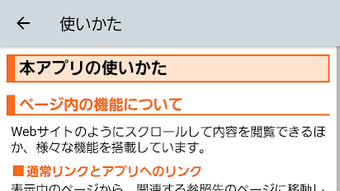
The SCV35 取扱説明書 features a clean, structured interface designed for easy navigation. The layout organizes content into logical sections such as “Getting Started,” “Camera,” “Battery,” and “Support,” enabling users to locate information efficiently. Navigation is handled through a menu bar and internal search, minimizing the number of taps required to access key details.
The workflow is linear and intuitive, making it accessible even for users with limited technical experience. The app supports text, images, and diagrams to illustrate procedures, enhancing comprehension. Performance observations are based on general software behavior patterns.
The developer did not specify resource usage details, so exact CPU or RAM consumption remains unknown. Stability is expected to be high, given its official status and targeted deployment. No reported crashes or freezes were mentioned.
The app functions as a static reference tool, so performance demands are minimal during typical use. Users should ensure sufficient storage space is available for installation, as the file size was not specified.
Compatibility & System Requirements
The SCV35 取扱説明書 is compatible exclusively with the Galaxy S8+ (SCV35) model. It is designed to run on Android operating systems and is distributed through the Samsung Galaxy Store. The developer did not provide additional system requirements such as minimum RAM, processor speed, or storage capacity.
Exact performance details were not specified. Compatibility information was partially provided, confirming the app is intended only for the SCV35 variant of the Galaxy S8+. Users are advised to verify device model before downloading.
The application cannot be used on other Samsung or third-party devices. Installation is required to access content. The developer did not specify whether the app supports external storage or cloud synchronization.
Resource usage and background behavior were not detailed.
Pros and Cons
Pros
- Official, accurate documentation tailored specifically for the Galaxy S8+ (SCV35)
- Free to download and use with no in-app purchases
- Available offline after installation, ideal for users without constant internet access
- Includes troubleshooting guides and step-by-step visual instructions
- Simple, intuitive interface suitable for all user levels
Cons
- Only compatible with one specific device model (SCV35)
- Not available for other Samsung or non-Samsung smartphones
- Developer did not provide system requirements or performance metrics
- Updates may require additional data usage, potentially incurring fees
- Cannot be installed on desktop operating systems like Windows or Mac
FAQ Section
Is the SCV35 取扱説明書 compatible with other Galaxy S8+ models?
The app is specifically designed for the Galaxy S8+ (SCV35) model and may not function correctly on other variants of the Galaxy S8+.
Can I use this app without an internet connection?
Yes, once installed, the app can be accessed offline, allowing users to consult the manual without requiring a data connection.
Is the app safe to download?
As a free application distributed through the Samsung Galaxy Store, it is considered secure. However, users should ensure they are downloading from the official source to avoid third-party versions.
How do I update the SCV35 取扱説明書?
Updates are delivered through the Samsung Galaxy Store. Users will receive notifications when a new version is available.
Do I need to pay to use this app?
No, the SCV35 取扱説明書 is free to download and use with no hidden costs or subscription fees.
Final Thoughts
The SCV35 取扱説明書 delivers a focused, reliable resource for Galaxy S8+ (SCV35) users seeking clear, official guidance on their device. Its model-specific design ensures accuracy and relevance, making it an essential tool for both new and experienced users. While limited in scope due to its exclusive compatibility, it excels in providing structured, easy-to-follow instructions and troubleshooting support.
The absence of system requirements and performance data prevents deeper evaluation, but the app’s official origin and free availability enhance its credibility. For anyone owning the Galaxy S8+ (SCV35), this tool is a practical and secure way to improve device literacy and reduce dependency on external support. Download SCV35 取扱説明書 now to get the most out of your Galaxy S8+ (SCV35).







